
What players say
Acorn Dash: Pixel Capture excels at delivering a focused, addictive experience. The gradual speed increase keeps each round tense without becoming frustrating. The cute pixel art and cheerful sound effects create a welcoming atmosphere that appeals to both casual and dedicated players. Its strength lies in its simplicity: no menus, no power-ups, just pure timing and anticipation. This makes it an excellent choice for quick gaming sessions or for introducing younger players to arcade-style games. A well-crafted example of minimalist game design.
About this game
Core Gameplay Loop
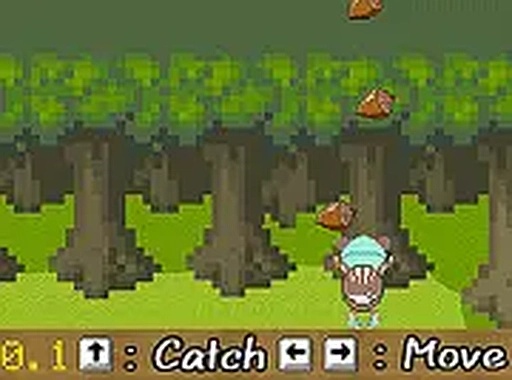
Acorn Dash: Pixel Catch presents a simple but engaging objective: position your character beneath falling acorns to collect them. Each successful catch adds a point to your total. The game world is presented in a charming pixel art style, creating a nostalgic feel that complements the straightforward mechanics. Players control their character's horizontal movement at the bottom of the screen, using either a mouse or keyboard. The core loop of catching acorns and watching your score grow provides immediate satisfaction, making it easy to start playing without any tutorials or instructions.
Difficulty Progression
As you continue playing, the falling acorns gradually increase in speed. This natural progression keeps the experience fresh and encourages you to improve your hand-eye coordination. The challenge ramps up smoothly, so you have time to adapt before the pace becomes demanding. This design ensures that the game remains accessible for newcomers while still offering a satisfying test for those seeking to refine their reflexes. The increasing speed also creates a sense of urgency that makes each session feel dynamic.
Visual and Audio Atmosphere
The pixel art visuals are a highlight, featuring a cute character and a simple, colorful backdrop. The art style evokes classic arcade games from the past, adding a layer of charm that appeals to both younger players and those with a fondness for retro gaming. The audio complements the visuals with cheerful sound effects that reward successful catches, enhancing the overall experience without being distracting. Together, the visuals and audio create a welcoming and pleasant atmosphere that encourages repeated play.
Accessibility and Platform
This game is designed for immediate access through any modern desktop web browser. No downloads, installations, or registrations are required. This makes it an ideal choice for a quick break during the day or a longer gaming session at home. The controls are intuitive, allowing players of all ages and skill levels to jump in without any learning curve. The game also supports full-screen mode, which helps immerse you in the pixel art world and focus on the falling acorns.
Skill Development and Replay Value
While the premise is simple, Acorn Dash: Pixel Catch offers genuine opportunities for skill development. Regular play helps improve reaction times, spatial awareness, and the ability to anticipate moving targets. The score tracking system encourages you to beat your personal best, providing a clear goal for each session. This focus on self-improvement, combined with the gradually increasing difficulty, gives the game lasting replay value. It is a perfect example of how a minimalist design can provide hours of engaging entertainment.







Player comments
Sign in to comment
You must be logged in before posting a review or rating.
No account? Create one
No comments yet. Be the first to comment!